

Conditional Recording
In the Statsig Console, you can configure your Session Replay settings under Project Settings → Analytics & Session Replay. You must be a project admin to modify these settings.Global Targeting Gate
The Global Targeting Gate controls who is eligible for session recording. If a user does not pass this gate, their sessions will never be recorded. By default, this is set to Everyone, meaning there are no restrictions—anyone can be recorded. You can think of this as defining the “top of the funnel” for session recording eligibility.Global Sampling Rate
The Global Sampling Rate determines what percentage of eligible sessions are recorded from the start. By default, this is set to 100%, meaning all eligible sessions are recorded automatically. You can lower this if you want to limit session recordings but still ensure a consistent percentage of sessions are always captured. This rate applies only to sessions that begin at the start and does not affect conditional triggers.Conditional Triggers: Events and Exposures
Conditional triggers can start a session recording mid-session, even if it wasn’t recorded from the beginning. These triggers respect the Global Targeting Gate but operate independently of the Global Sampling Rate. When triggered, the recording includes the last 30 seconds leading up to the event (if rolling window is enabled). There are three types of conditional triggers:- Gate Exposures — Trigger based on exposure to a specific gate, optionally filtered by group (e.g., Pass/Fail).
- Experiment Exposures — Trigger based on exposure to a specific experiment, optionally filtered by group (e.g., Test/Control).
- Events — Trigger based on specific logged event, optionally filtered by event values (e.g., “purchase_event” with value “book”).
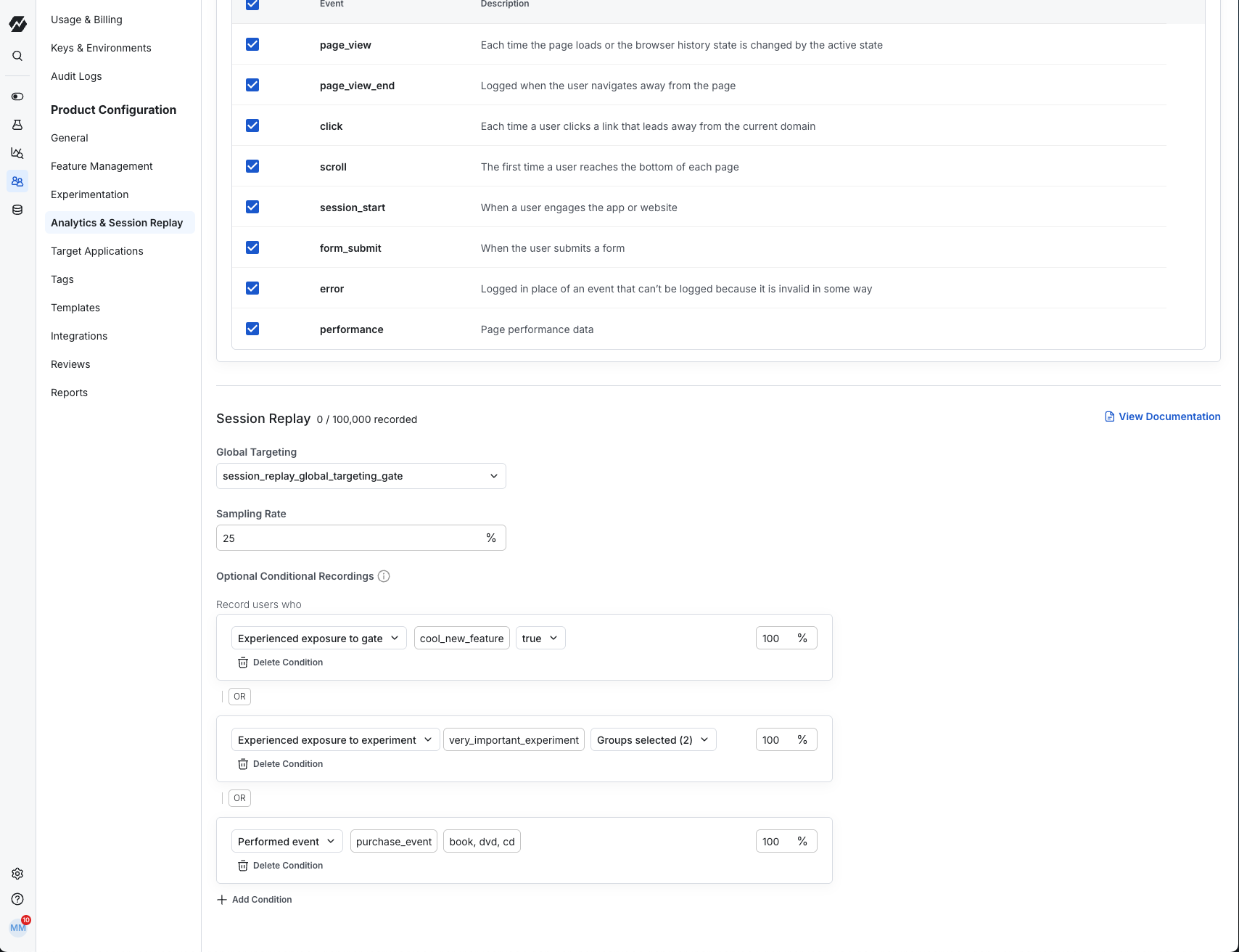
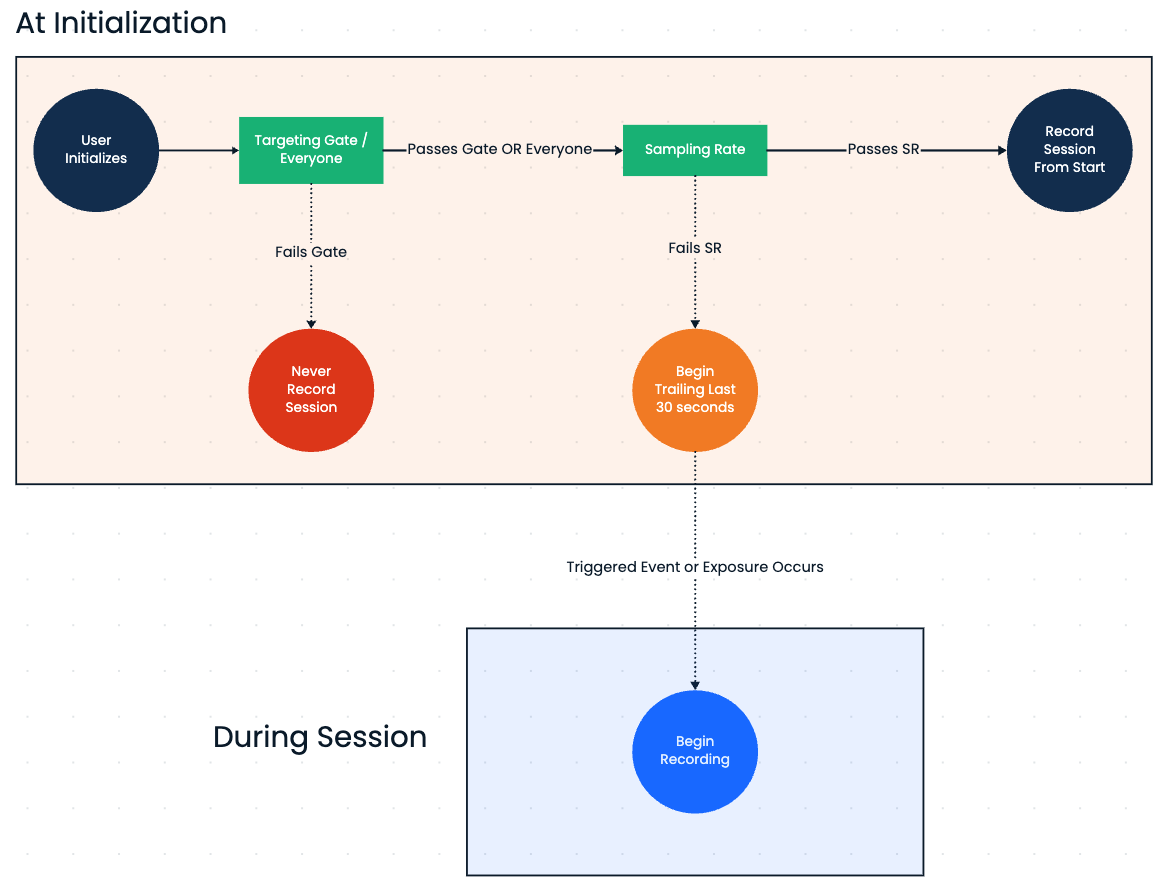
Example Walkthrough
Suppose you have the following setup (See image above):- The Global Targeting Gate
session_replay_global_targeting_gateallows all US users and excludes everyone else. - The Global Sampling Rate is set to 25%, so only 25% of eligible US user sessions are recorded from the start.
- For the remaining 75% of eligible users, session recording can still begin mid-session if a conditional trigger occurs.
- A US user starts a session. They do not pass the 25% Global Sampling Rate, so their session is not recorded from the beginning.
- Later, a
purchase_eventoccurs with valuebook. This event is set up as a conditional trigger with a 50% sampling rate. If this session fails the sampling rate check, recording does not start. - A minute later, the user is exposed to the
cool_new_featuregate, and the recording begins
A trigger’s sampling rate is consistent for the entire session based on session_id. So if
purchase_event fails the sampling rate once, future occurrences of the same event in that session will also fail.Initialization - StatsigTriggeredSessionReplay
- Javascript
- React
Initialization Options
autoStartRecordingtrue: Recording can start automatically after initialization. Global targeting gate and sample rate are respectedfalse: You must manually start recording using startRecording(). This is helpful if you want to start the recording after a set point and block any auto-recording before then
keepRollingWindowtrue: Statsig maintains a local rolling window of the last 30 seconds of the session, allowing recordings to include context leading up to a trigger.false: If a conditional trigger occurs, recording begins from that moment onward, with no historical context.
Advanced: Forcing a Recording on Demand
You may have a use case where you want to manually start a recording. To do this, we offer the startRecording API which will begin recording as soon as you call it.startRecording: Respects both the Global Targeting Gate and Global Sampling Rate. This is useful if you still want to start your recordings after a certain point (e.g. after login) but still take advantage of the Global Sampling RateforceStartRecording: Respects the Global Targeting Gate but is not subject to the Global Sampling Rate. Useful for debugging or when you don’t want to be subjected to the Global Sampling RatestopRecording: Stops the current recording, if one is in progress. Calling this method when no recording is active has no adverse effects. After stopRecording is called, conditional recording triggers will not automatically restart the recording. Only an explicit call tostartRecordingorforceStartRecordingwill resume recording.
@Statsig/session-replay and call it using your SDK key
Additional Options
These are options offered by the rrweb recorder (the open source recording tool we use)Configure Recording Privacy/PII Options
If your users may be entering or viewing sensitive information, you can prevent this from being recorded and displayed using the mask, block, or ignore options listed above. The most commonly used options are:- An element with the class name
.rr-blockwill not be recorded. Instead, it will replay as a placeholder with the same dimensions. - An element with the class name
.rr-ignorewill not record its input events. - All text of elements with the class name
.rr-maskand their children will be masked. input[type="password"]will be masked by default.